
Since 13 October 2026 the Chrome UX Report has published experimental versions of LCP, INP and CLS that count soft navigations, the in-app page changes of single-page apps. The data comes from the Soft Navigations API, which Chrome 151 turned on by default on 28 July. Your stable Core Web Vitals stay as they were, and Search Console is due to switch to the new numbers once Chrome takes them out of experimental, which it aims to do in May 2027.
The short version
- 01Chrome 151 detects in-app route changes by itself, so each one can get its own LCP, INP and CLS. Only Chromium browsers support it.
- 02Before this, CrUX counted only the first page load of a single-page app and charged every later interaction and layout shift to the landing URL.
- 03Since 13 October CrUX has experimental LCP, INP and CLS that include soft navigations. About 70% of origins have almost no soft navigations and should see little or no change. On Android, good LCP went from 26% to 87% of origins with 75 to 100% soft navigations.
- 04Rankings: Google's stable scores are unchanged. Chrome aims to graduate the metrics in May 2027, and Search Console will then switch to the new data. Google has not said when or whether ranking systems will use them.
- 05See your numbers in CrUX Vis or the CrUX API, the DevTools Performance panel, and your own data through web-vitals 6 or Next.js 16.4.
- 06The clock starts at the click. Show feedback right away, keep click handlers small, have the next route's data before the click, and load its main image early.
What counts as a soft navigation since Chrome 151
Since Chrome 151, the browser itself decides when an in-app page change counts as a navigation, and measures it separately. Chrome's documentation defines a soft navigation with three conditions:
- 01The navigation is initiated by a user action.
- 02It results in a visible URL change.
- 03The interaction results in a visible paint.
Chrome 151 added two entry types to the performance timeline, soft-navigation and interaction-contentful-paint, and turned them on by default. The browser applies this rule on its own, so the web-vitals documentation notes that existing apps can be measured as they are, and more consistently across frameworks. Chrome also says the rule will produce false positives and false negatives on some sites.
Each soft-navigation entry carries the new URL in its name, a navigationId, and the interactionId of the click or tap that started it. Its startTime is that interaction, so your event handler's run time counts toward the new route. LCP for a soft navigation comes from the interaction-contentful-paint entries, which report new paints in the parts of the page the interaction changed.
To check that your app produces these entries, open it in Chrome 151 or later, paste this into the console and click around:
if (PerformanceObserver.supportedEntryTypes.includes('soft-navigation')) {
  new PerformanceObserver((list) => {
    for (const entry of list.getEntries()) {
      console.log(entry.name, entry.navigationId, Math.round(entry.startTime))
    }
  }).observe({ type: 'soft-navigation', buffered: true })
}
Chrome's guide adds two limits. getEntriesByType returns only the first 50 buffered soft navigations, so a long-lived app needs an observer like this one. And support covers Chrome and Edge from version 151, not Firefox or Safari.
On a Next.js App Router site, Link makes client-side transitions: Next.js updates the content without reloading the page. A click that changes the URL and paints the new route matches Chrome's definition. Not every route change will qualify, though. Sentry, which sells monitoring software, wrote on 29 October that in its own app about three in four route changes in Chrome counted as soft navigations.
Why Core Web Vitals under-measured single-page apps
Until October, CrUX recorded only the first load of a single-page app. Chrome's announcement says the in-app page changes that followed were ignored as separate loads, and every interaction and layout shift from the whole session was grouped into that landing page.
That created three distortions:
- LCP. A single-page app reported one LCP per visit, from the initial load, which Chrome calls the slower one. A multi-page site reported one for every page a visitor opened, and Chrome puts it plainly: "follow-up clicks are faster on any site".
- INP. The experimental INP is now measured per page view. Before, the slowest interaction of a whole session counted against the landing URL, so one slow click anywhere in a long visit set the INP for the page where the visit began.
- CLS. Layout shifts kept adding up across the session, again against the landing URL.
There was also a gap in coverage. Pages of a single-page app that visitors reach only by clicking, such as the second step of a form, had no data under their own URL. In the CrUX API each soft navigation is now reported under the URL the user went to, subject to the usual eligibility rules.
Your own monitoring could fill the gap only with custom code, and Chrome notes that this made results hard to compare across sites.
What changed in CrUX on 13 October
CrUX now has three experimental metrics that blend soft navigations with hard ones: experimental_largest_contentful_paint_with_softnavs, experimental_interaction_to_next_paint_with_softnavs and experimental_cumulative_layout_shift_with_softnavs. They are in BigQuery, the CrUX API and the CrUX History API from the release of 13 October, and CrUX Vis shows them too.
Chrome labels them experimental to invite feedback and tells readers to expect shifts from month to month. It expects to add soft navigation versions of First Contentful Paint and navigation types in the November release. (Update, November 2026: The CrUX release of 11 November 2026 added both to the CrUX APIs as experimental_first_contentful_paint_with_softnavs and experimental_navigation_types_with_softnavs, and CrUX Vis now shows them. BigQuery is due to get them with the next monthly release.)
Most sites will not see a difference
Across all origins in CrUX, around 70% have fewer than 5% soft navigations. By platform the range is 66 to 75%. Chrome says a site that does not swap content and update the URL with JavaScript should not expect its numbers to change.
The sites that change are the ones built as single-page apps whose visitors click through several views. They are a small share of all origins and more than a third of the top 1,000:
- All CrUX origins
- Android: 7.0% Desktop: 10.6%
- Top 1000 sites
- Android: 35% Desktop: 42%
Chrome, web.dev blog, 13 Oct 2026
How LCP, INP and CLS scores move
Across all origins the change is small. In the September 2026 dataset, published on 13 October, 55.9% of origins had good Core Web Vitals on the stable metrics and 59.5% would have with soft navigations included. That is 3.6 percentage points. The CrUX release notes describe it as a 6.4% increase, which is the relative change.
- LCP
- Stable metric: 68.3% With soft navigations: 72.1%
- CLS
- Stable metric: 81.7% With soft navigations: 85.1%
- INP
- Stable metric: 85.4% With soft navigations: 87.4%
- All three
- Stable metric: 55.9% With soft navigations: 59.5%
Chrome UX Report release notes, September 2026 dataset, published 13 Oct 2026
For sites that are mostly soft navigations, the change is large. Among Android origins where 75 to 100% of page views are soft navigations, the share with good LCP goes from 26% on the stable metric to 87% on the experimental one.
- Stable metric
- 26%
- With soft navigations
- 87%
Chrome, web.dev blog, Figure 2, 13 Oct 2026
Chrome stresses that this is not because single-page apps are faster than multi-page sites overall. Their follow-up views now count, and those views reuse code and assets from the first load.
The other two metrics move too, by less:
- INP: for sites with mostly soft navigations, measuring per page view roughly doubles the Android pass rate. Even so, Chrome says sites heavy in soft navigations still trail multi-page sites on good INP, and heavy JavaScript work during route changes can still cause INP problems.
- CLS: with shifts split by view, sites heavy in soft navigations come in line with multi-page sites on desktop and nearly match them on Android.
The INP point is the one to keep. The new accounting removes a penalty that came from long sessions. It does not remove slow clicks.
What Google says about soft navigations and ranking
Google has announced no ranking change. Chrome's announcement says Google's stable Core Web Vitals scores remain unchanged while the experimental versions are evaluated next to them.
The timeline is a target. Chrome aims to take the metrics out of experimental in May 2027, subject to feedback, and once they graduate, Search Console will switch to the new data.
Google's page experience documentation, last updated on 22 September 2026, says three things about ranking:
- Core Web Vitals are used by Google's ranking systems.
- Good results in Search Console or third-party tools do not guarantee top rankings.
- Google always tries to show the most relevant content, even with a poor page experience. A great page experience can help when many helpful pages compete for a query.
What Google has not said: neither the 13 October announcement nor the Search Central documentation says whether ranking systems will use the soft navigation versions of the metrics, or from when. We did not find a Google statement on that.
Our opinion: if your single-page app fails Core Web Vitals today, check the experimental numbers before you plan a rewrite or a move to Webflow or WordPress. Part of the failure may be the old accounting. If the experimental numbers still fail, especially on INP, the problem is real and users feel it on every click.
How to see your own soft navigation numbers
Look in three places: CrUX for Chrome users in aggregate, DevTools for one session, and your own field data for every route.
In CrUX Vis and the CrUX API
- 01Open CrUX Vis and enter your origin or a URL. Chrome updated it to show the new metrics, and Search Engine Journal describes the control as a toggle that includes soft navigations.
- 02For raw numbers, query the CrUX API for the stable and experimental metrics side by side. You need an API key. Use
urlin place oforiginfor a single page.
curl -s -X POST "https://chromeuxreport.googleapis.com/v1/records:queryRecord?key=API_KEY" \
  -H "Content-Type: application/json" \
  -d '{"origin":"https://www.example.com","formFactor":"PHONE","metrics":["largest_contentful_paint","experimental_largest_contentful_paint_with_softnavs","interaction_to_next_paint","experimental_interaction_to_next_paint_with_softnavs"]}'
Each metric comes back as a three-bin histogram with a 75th percentile. Compare the p75 of each pair. Google's thresholds for a good experience are LCP within 2.5 seconds, INP under 200 milliseconds and CLS under 0.1. web.dev's INP guide recommends measuring at the 75th percentile of page loads.
On a multi-page site the two numbers in each pair should be close. If they are far apart, soft navigations are likely a large share of your traffic.
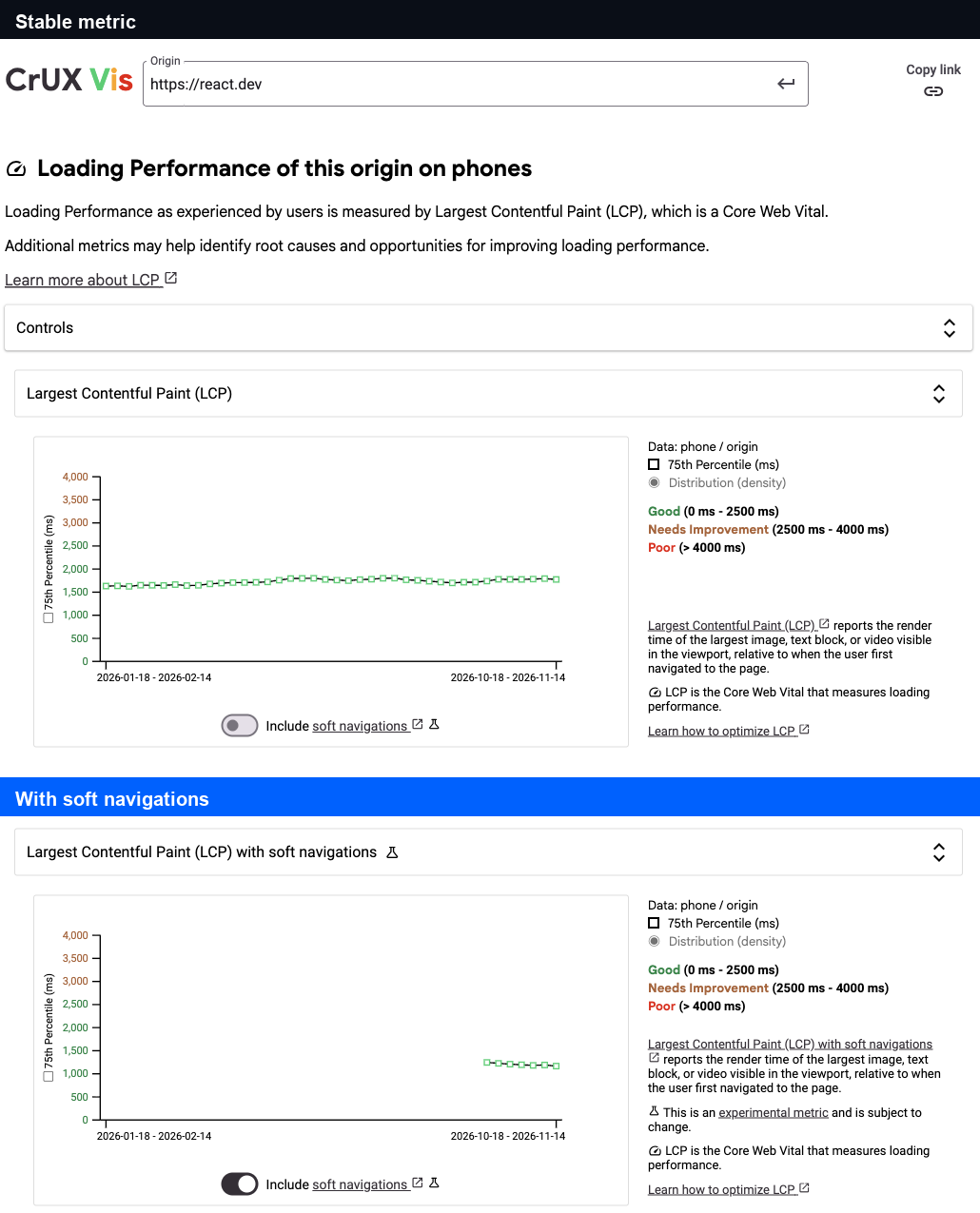
In the DevTools Performance panel
Since Chrome 152, per the DevTools post of 25 August, the Performance panel's Live Metrics view reports Core Web Vitals for soft navigations by default. The round-up of 22 September added soft navigation analysis to Insights. Open the panel, click from one route to another, and record a trace when a route is slow.
In your own field data with web-vitals or Next.js
CrUX gives you aggregates. web.dev notes that it often lacks the context your own monitoring can collect, such as which interaction was slow. The web-vitals library added soft navigation support in version 6.0.0, released on 21 July 2026.
import { onCLS, onINP, onLCP } from 'web-vitals'

const softNavs = { reportSoftNavs: true }

onLCP(sendToAnalytics, softNavs)
onINP(sendToAnalytics, softNavs)
onCLS(sendToAnalytics, softNavs)
What the library documentation says you get, and what changes:
- Every metric carries
navigationType, which issoft-navigationfor route changes, andnavigationURL, the route it belongs to. UsenavigationURLand not the current address, because a metric can be reported after the user has moved on. - TTFB is reported as 0 for soft navigations, and their LCP counts only new paints. An element that stays on screen across routes does not count.
- The landing page's CLS and INP are finalized at the first soft navigation. Turning the option on changes your page load numbers too.
- In browsers without the API, nothing changes even with the option on.
To keep a stream comparable with your history, register a second set of callbacks without the option and store the two separately, as the documentation suggests.
On Next.js the hook turns soft navigation reporting on for you from version 16.4.0, published on 6 October 2026. In the source of that version, useReportWebVitals passes reportSoftNavs: true for CLS, LCP, INP and FCP. Version 16.3 did not. So a Next.js upgrade also changes your metrics, from the day you deploy it. (Update, November 2026: Next.js 16.4.5, released on 3 November 2026, is a security release for the 16.4 line, and the Next.js team asks users to patch. An upgrade made for soft navigation reporting should go to 16.4.5 or later.)
A minimal App Router reporter, following the Next.js documentation:
'use client'

import { useReportWebVitals } from 'next/web-vitals'

// Module-level function: the callback reference must not change between renders.
function send(metric) {
  navigator.sendBeacon('/api/vitals', JSON.stringify({
    name: metric.name,
    value: metric.value,
    id: metric.id,
    navigationType: metric.navigationType, // 'soft-navigation' for route changes
    url: metric.navigationURL,             // the route this metric belongs to
  }))
}

export function WebVitals() {
  useReportWebVitals(send)
  return null
}
We would keep one reporter per stream. On Next.js 16.4 or later, a direct web-vitals call with reportSoftNavs that sends to the same place as the hook counts every soft navigation twice. A direct call without the option is how you keep the hard navigation stream.
If you use a monitoring vendor, ask whether it reports soft navigations, as Chrome's guide advises. Sentry, for example, announced on 29 October that version 11 of its JavaScript SDKs captures them by default.
How to fix slow route changes in Next.js
For a soft navigation, Chrome starts the clock at the click and stops LCP at the largest new paint. The click itself is usually counted in the INP of the page you are leaving. So the work between the click and the next frame shows up as INP on one URL, and the work until the new content appears shows up as LCP on the next.
This is where we would start on a Next.js site.
1. Show the new route right after the click
When a link points to a dynamic route with no loading state, Next.js waits for the server response before it shows the new route. Its documentation warns that this can make the app look unresponsive, and on a soft navigation that wait is part of LCP.
Next.js recommends a loading.tsx file on dynamic routes. Its documentation says this gives immediate navigation and visual feedback, keeps shared layouts interactive, and lets Next.js prefetch part of a dynamic route ahead of time.
// app/products/[slug]/loading.tsx
export default function Loading() {
  return <ProductPageSkeleton />
}
We would give the skeleton the same dimensions as the real content, because layout shifts after the soft navigation count against the new route. On slow networks, where the loading state may not be prefetched yet, Next.js offers the useLinkStatus hook to show a pending hint on the clicked link.
2. Keep click handlers small
Chrome warns that heavy main-thread JavaScript during route transitions can still cause INP problems. web.dev's INP guide recommends that event callbacks run only the logic needed for the next visual update and defer everything else to a later task. We would move analytics calls, logging and state that nothing on screen depends on into that later task.
'use client'

import Link from 'next/link'

// scheduler.yield() is available in Chromium from version 129; setTimeout is the fallback.
function yieldToMain() {
  if (globalThis.scheduler?.yield) return globalThis.scheduler.yield()
  return new Promise((resolve) => setTimeout(resolve, 0))
}

export function ProductLink({ product }) {
  return (
    <Link
      href={`/products/${product.slug}`}
      onClick={async () => {
        await yieldToMain()
        trackProductClick(product.id) // runs in a later task
      }}
    >
      {product.name}
    </Link>
  )
}
The handler returns at the first await, so the link's own navigation runs straight away and tracking moves to a later task. Since the soft navigation's start time includes your handler code, a slow handler costs you on LCP as well as INP.
3. Have the next route's data before the click
LCP for a soft navigation includes any data you fetch after the click. Next.js prefetches routes linked with Link when the links enter the viewport, and its documentation says how much depends on the route:
| Route type | What Next.js prefetches | What a click waits for |
|---|---|---|
| Static route | The full route | Nothing, if the prefetch finished |
Dynamic route with loading.tsx | Shared layouts and the loading skeleton | The server render of the page content |
Dynamic route without loading.tsx | Nothing | The server response before anything changes |
Three things from the same documentation follow from this:
- 01If a dynamic segment could be prerendered, add
generateStaticParamsso it is built ahead of time. - 02Setting
prefetch={false}on a link means static routes are fetched only on click and dynamic routes are rendered on the server first. For long lists, the documentation suggests prefetching on hover as a middle ground. - 03
Linkmust be hydrated before it can prefetch, so a large JavaScript bundle can delay prefetching on the first visit.
4. Load the new route's main image early
On a soft navigation the LCP element is the largest new paint. If that is a product photo or an article image, its download is on the clock from the click.
The Next.js image documentation names the LCP image as a case for its preload prop, then says that in most cases you should use loading="eager" or fetchPriority="high" instead. Since Next.js 16 the old priority prop is deprecated.
<Image src={product.image} alt={product.name} width={800} height={600} fetchPriority="high" />
We would check the LCP element for soft navigations separately from direct loads, using the navigationType you store with each sample, as Chrome's guide recommends. Chrome's own example shows why: a banner image that stays across routes is the LCP on a direct load and drops out after a click, so speeding up the banner does nothing for the soft navigation.
5. Find the slow route first
Pick the routes with the most soft navigations and the worst p75 LCP or INP in your own data, and reproduce them in the DevTools Performance panel. A fix you cannot see in a trace is a guess.
What to watch until May 2027
The experimental data will move before it settles, and Chrome has said so. Three habits keep you from misreading it:
- Write down your stable and experimental p75 values each month. A jump without a deploy may be a change in the measurement.
- If you upgrade to Next.js 16.4 or later, mark the date in your analytics. Landing page INP and CLS change that day for reasons unrelated to speed. Plan the upgrade together with your routine for Next.js security releases, so the version you move to is also patched.
- Keep a hard navigation stream next to the soft navigation one, so your history stays comparable.
The fixes stay the same either way. A route change that responds at once and shows its main content quickly helps the people using the site today, whatever the reports end up counting.
Sources
- 01Chrome for Developers, Chrome 151 release notes, 28 July 2026
- 02Chrome for Developers, Barry Pollard and Michal Mocny, Measuring soft navigations, version last updated 2 September 2026 (archived copy of 15 October 2026)
- 03web.dev, Annie Sullivan, Experimental soft navigation metrics now available in CrUX, 13 October 2026
- 04Chrome for Developers, CrUX release notes, September 2026 dataset, 13 October 2026
- 05Chrome for Developers, CrUX API, last updated 13 October 2026
- 06Search Engine Journal, Matt G. Southern, Google Adds Experimental Soft Navigation Metrics To CrUX, 13 October 2026
- 07Google Search Central, Understanding page experience in Google Search results, last updated 22 September 2026
- 08Google Search Central, Understanding Core Web Vitals and Google search results, last updated 10 December 2025
- 09GoogleChrome, web-vitals README and changelog, v6.2.3, 5 October 2026 (soft navigation support added in v6.0.0, 21 July 2026)
- 10Chrome for Developers, Matthias Rohmer, What's new in DevTools (Chrome 152), 25 August 2026
- 11Chrome for Developers, Matthias Rohmer, New in DevTools, October 2026, 22 September 2026
- 12Vercel, Next.js v16.4.0 release notes, 7 October 2026 (npm package published 6 October 2026), and pull request #97232, merged 3 September 2026
- 13Next.js documentation, useReportWebVitals, v16.4.0, 6 October 2026
- 14Next.js documentation, Linking and Navigating, v16.4.3, 23 October 2026
- 15Next.js documentation, Image component, v16.4.3, 23 October 2026
- 16web.dev, Jeremy Wagner, Philip Walton and Barry Pollard, Optimize Interaction to Next Paint, last updated 2 September 2025
- 17web.dev, Jeremy Wagner and Brendan Kenny, Optimize long tasks, last updated 19 December 2024
- 18Sentry, Abdelrahman Awad and Sergiy Dybskiy, Measuring soft navigation web vitals, 29 October 2026
- 19Chrome for Developers, CrUX release notes, October 2026 dataset, 11 November 2026, and CrUX API metric list, last updated 11 November 2026 (update note)
- 20Next.js, November 2026 Security Release, 3 November 2026, and v16.4.5 release, 3 November 2026 (update note)
Frequently asked questions
Will soft navigations affect my Google rankings?
Google has announced no change. Chrome says the stable Core Web Vitals scores stay unchanged while the experimental soft navigation versions are evaluated. Chrome aims to graduate the new metrics in May 2027, subject to feedback, and Search Console will then switch to the new data. Google has not said when or whether its ranking systems will use them.
Does my Next.js site count as a single-page app for this?
If it uses the Link component for client-side transitions, its route changes can be measured as soft navigations. Chrome decides on its own: a user action, a visible URL change and a visible paint. Not every route change qualifies. Sentry, a monitoring vendor, reported that in its own app about three in four route changes in Chrome did.
Why does my single-page app look faster with soft navigations included?
Because later views in the same visit now get their own measurements, and those views reuse code and assets that the first load already downloaded. Chrome says this is not because SPAs are faster than multi-page sites overall. Follow-up clicks are faster on any site, and SPAs now get credit for them.
Which browsers report soft navigations?
Chromium browsers from version 151, such as Chrome and Edge. Firefox and Safari do not support the API. In those browsers the web-vitals library keeps reporting one set of metrics per page load, even with soft navigation reporting turned on.
Do I need to change code to measure soft navigations?
Chrome detects them without any change to your app. To get them into your own analytics, use web-vitals 6 with the reportSoftNavs option, or Next.js 16.4 or later, whose useReportWebVitals hook turns it on. Store the navigationType and navigationURL fields with every metric so you can tell route changes from page loads.